SASSA Status Check for SRD R370 (2026)
On this page (7 sections)
Check your SRD status free on SASSA's official portal: go to srd.sassa.gov.za, click “Application status”, and enter your ID number and the phone number you applied with. You can also check by WhatsApp (082 046 8553) or USSD (*134*7737#). This page explains every result you might see.
Opens srd.sassa.gov.za, the only official SRD status check. We never see or store what you enter there.
Check online (fastest)
- Open the official portal
Go to srd.sassa.gov.za — check the address ends in .gov.za.
- Find “Application status”
Scroll to the “Check your application status” section and click the button.
- Enter your details
Your 13-digit ID number and the cellphone number you used to apply. No password is needed.
- Read your month-by-month results
Each month shows its own outcome — Approved, Pending, or Declined with a reason. Approved months show a pay date once processing is done.
Check by WhatsApp
Save 082 046 8553 as a contact, send “Status” to it on WhatsApp, and follow the prompts — you'll confirm your ID number and the phone number on your application. Useful when data is tight: WhatsApp works on most bundles.
Check by USSD (no data needed)
Dial *134*7737# from the phone number registered on your application and follow the menu. This works on any phone with no data or airtime cost from the major networks.
Check by phone
Call SASSA's toll-free line on 0800 60 10 11. Expect queues near payment dates — the online, WhatsApp and USSD routes are faster.
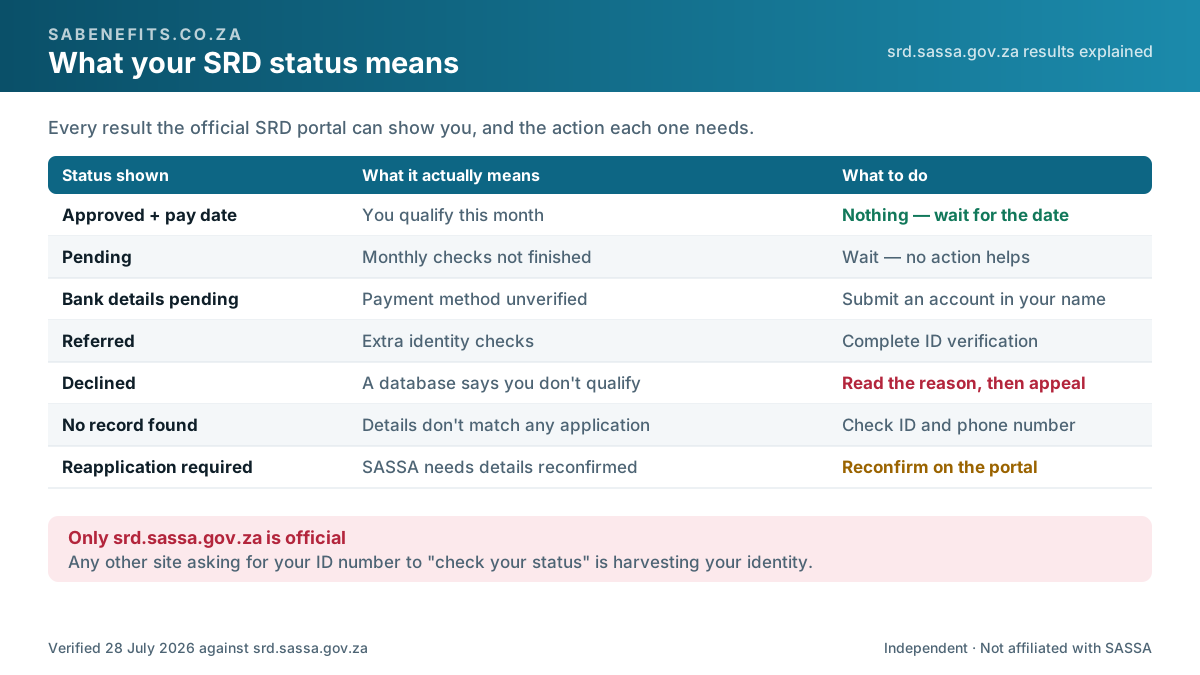
What every status means
| Status | What it means | What to do |
|---|---|---|
| Approved (with pay date) | You qualify this month; payment is scheduled | Nothing — wait for the date. No date showing? See below |
| Approved (no pay date yet) | You qualify; payment not yet processed | Wait a few days and re-check. Persisting? Payment not received |
| Pending | Checks for the month aren't finished | Wait — most resolve within the month. No action changes it |
| Bank details pending | Your payment method isn't verified yet | Fix bank details |
| Referred | Flagged for extra fraud/identity checks | Complete ID verification if asked: walkthrough |
| Declined | A database check says you don't qualify this month | Read your exact reason — many are wrong and appealable |
| Cancelled | You (or SASSA) cancelled the application | Reapply if you still need it |
| Reapplication required | SASSA needs you to confirm your details again | Reconfirm as soon as possible — no payment until you do |
| No record found | The system can't match your details to an application | Diagnose it — usually a detail mismatch |
Still unsure what your result means? Reading a second explanation in different words often makes an unclear status click into place. vsrd.co.za covers the same ground independently — like SA Benefits, it is not affiliated with SASSA and carries its own scam warnings. Wherever you read about it, the status check itself still happens only on srd.sassa.gov.za.
Frequently asked questions
How often should I check?
Once or twice a month is enough — after the middle of the month for the outcome, and near month-end for the pay date. Statuses update on SASSA's schedule; checking hourly changes nothing.
My status is Approved but there's no money in my account.
A pay date on the status is when SASSA releases payment; banks can take 2–3 days to reflect it. Longer than that: payment not received.
Can I check someone else's status?
Only with their ID number and registered phone number — which they should not share. Helping a family member? Do it together on their phone.
The portal says my phone number doesn't match.
You likely applied with a different number. See change phone number — there is an official process even if you lost the SIM.
Verified information
- Responsible body
- South African Social Security Agency (SASSA)
- Official source
- sassa.gov.za
- Status
- Confirmed, some figures pending
- Date verified
- Confidence
- High confidence
Eligibility rules, processes and the amounts in force since 1 April 2026 are confirmed against official sources. Any figure still awaiting confirmation is marked * where it appears.
SA Benefits is independent and not affiliated with SASSA or government. Editorial guidance on this page is clearly separated from official information — see how we verify.
What's changed on this page (1)
Published with all nine status meanings, the four official check channels (online, WhatsApp, USSD, phone), and a next step for each result.
Site-wide corrections are logged publicly in the corrections register.
Was this page helpful?
Your answer stays in your browser — we don't collect anything. It helps us decide what to fix and write next.